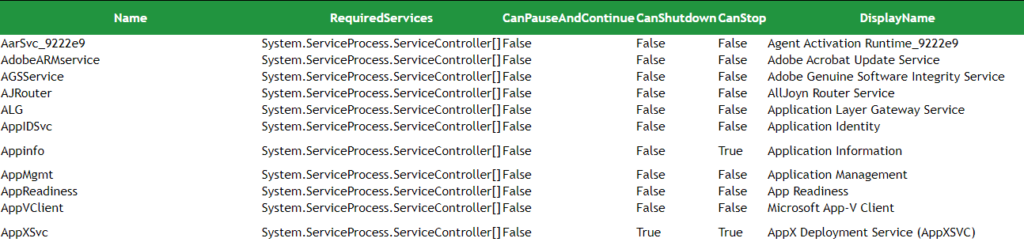
Use CSS to style HTML reports in PowerShell
Table of Contents
ConvertTo-HTML allows to add all kind of different elements into an HTML file. HTML files have a simple structure that usually include a head and a body. Those elements can be modified with ConvertTo-HTML parameters. Let us check the syntax of this cmdlet first (this cmdlet has two sets of parameters, we are using the first one):
ConvertTo-Html
              [-InputObject <PSObject>]
              [[-Property] <Object[]>]
              [[-Body] <String[]>]
              [[-Head] <String[]>]
              [[-Title] <String>]
              [-As <String>]
              [-CssUri <Uri>]
              [-PostContent <String[]>]
              [-PreContent <String[]>]
              [-Meta <Hashtable>]
              [-Charset <String>]
              [-Transitional]
              [<CommonParameters>]
When it comes to HTML, “The element is a container for metadata (data about data)”. It typically contains information like scripts, character sets and style. Naturally, we need to find a way to modify the style of the resultant file and we can do that using CSS. There is three ways to include CSS in an HTML:
- Inline: by setting the style attribute inside the HTML element tags.
- Internal: with the style element inside the head tag.
- External: by calling an external file with the CCS code in it.
Internal could be useful if you just want to stylish a single report. The downside is that it requires to hard code CSS inside the PS code, which may not be functional if you want to use the same style for different reports or if you want to just change the style in separate file instead of changing all your scripts. With that said, I will cover both ways here.
Internal CSS to style an HTML report
This method involves creating the set of rules for CSS inside the head element of the HTML. Turns out there is a parameter with the name -head available for ConvertTo-HTML. According to the documentation, -Head: “Specifies the content of the tag.” That is what we need since we want to include something inside
. But which elements should we style in the CSS code? If we check the -As parameter of ConvertTo-HTML we can see that the resultant object, the HTML, is formatted as a table by default (it can be a list too). With that in mind, we will be including rules for tags such as and | in our CSS.
| The following CCS rule changes the font, borders, padding and width properties of a table (
|