
With the matrix strategy in GitHub Actions, you can automatically create multiple job runs based on the combinations of the variables defined in the matrix. GitHub Actions workflows expose this through the jobs.<job_id>.strategy.matrix property, which enables running different variations of a job.
A matrix can be single or multi-dimensional, depending on the number of variables it defines. The number of resulting jobs for a given matrix can be calculated as follows:
Number of jobs = n1 * n2 * … nk
Where k represents the number of matrix variables and each n represents the number of values for a given variable.
Let’s apply this formula to an example of each type of matrix:
Single-dimension matrix
jobs:
  example_matrix:
    strategy:
      matrix:
        version: [10, 12, 14]
In this example, the version variable has 3 values. Since there is only one matrix variable with 3 possible values, we get:
Number of jobs = n₁ = 3
Multi-dimension matrix
jobs:
  example_matrix:
    strategy:
      matrix:
        os: [ubuntu-22.04, ubuntu-20.04]
        version: [10, 12, 14]
        arch: [x86, x64]
In this example, we have three variables, each with a different number of values. Applying the formula, we get:
Number of jobs = n₁ × n₂ × n₃ = 2 × 3 × 2 = 12
Creating a JSON matrix with a bash script
The elements inside the matrix property can also be generated as JSON and then passed to the workflow. The same properties defined in the YAML syntax can also be included in the JSON. Using the same YAML from the last example, we get the following JSON object:
{
  "os": ["ubuntu-22.04", "ubuntu-20.04"],
  "version": [10, 12, 14],
  "arch": ["x86", "x64"]
}
Let’s start with the matrix in a YAML file and then transform it to JSON using a script:
jobs:
  use-matrix:
    runs-on: ubuntu-latest
    strategy:
      matrix:
        name: [first, second, third]
        number: [1, 2]
        letter: [A, B]
    steps:
      - run: |
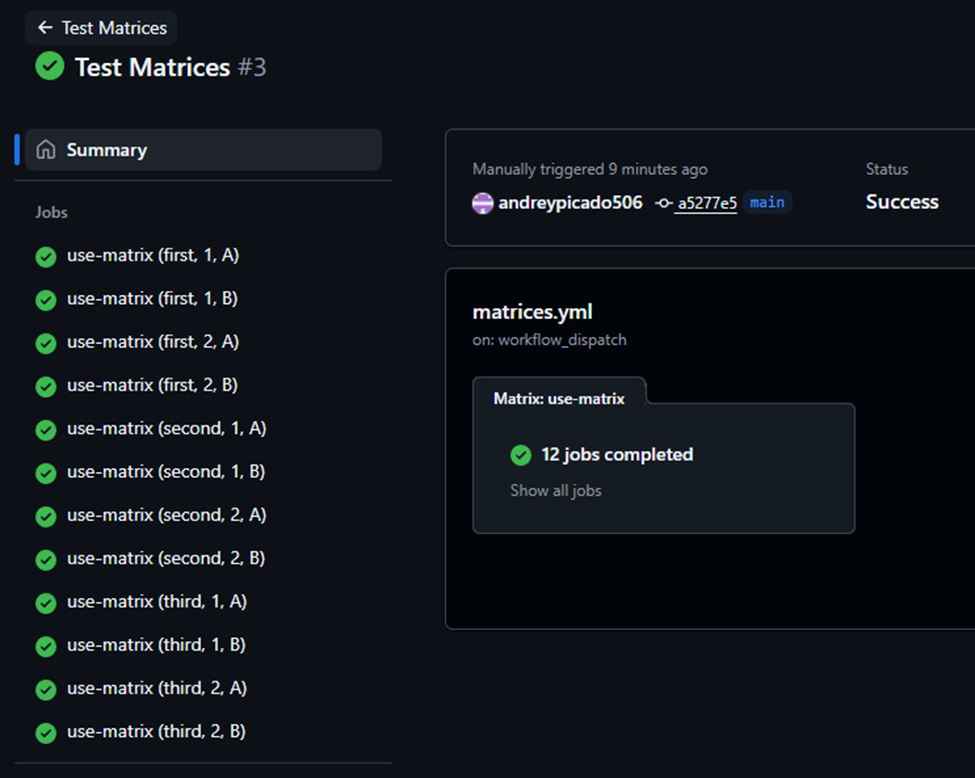
          echo "${{ matrix.name }}: ${{ matrix.number }}${{ matrix.letter }}"
According to the formula, this should generate n₁ × n₂ × n₃ = 3 × 2 × 2 = 12 jobs, which is correct:
Now, let’s generate the same matrix from the previous job and expose it as an output to use later:
jobs:
  build-matrix:
    runs-on: ubuntu-latest
    outputs:
      custom-matrix: ${{ steps.build-matrix.outputs.custom-matrix }}
    steps:
      - name: Build matrix
        id: build-matrix
        run: |
          names=(first second third)
          numbers=(1 2)
          letters=(A B)

          # Build JSON with jq
          json=$(jq -n \
            --argjson names "$(printf '%s\n' "${names[@]}"   | jq -R . | jq -s .)" \
            --argjson nums  "$(printf '%s\n' "${numbers[@]}" | jq -R . | jq -s 'map(tonumber)')" \
            --argjson lets  "$(printf '%s\n' "${letters[@]}" | jq -R . | jq -s .)" '
            {
              name:   $names,
              number: $nums,
              letter: $lets
            }')

          {
            echo 'custom-matrix<<EOF'
            echo "$json"
            echo EOF
          } >> $GITHUB_OUTPUT

  use-matrix:
    runs-on: ubuntu-latest
    needs: build-matrix
    strategy:
      matrix: ${{ fromJson(needs.build-matrix.outputs.custom-matrix) }}
    steps:
      - run: |
          echo "${{ matrix.name }}: ${{ matrix.number }}${{ matrix.letter }}"
A few things to notice about this script (build-matrix job):
- We are using
jqso we can define the elements of the JSON as variables (arrays, in this case). - The matrix is a multi-line JSON object, which can be tricky to work with. Be sure to keep the same output format when exporting the matrix in the
build-matrixjob. - The
fromJsonfunction in thematrixproperty of theuse-matrixjob is what makes this work; without it, the workflow will fail.
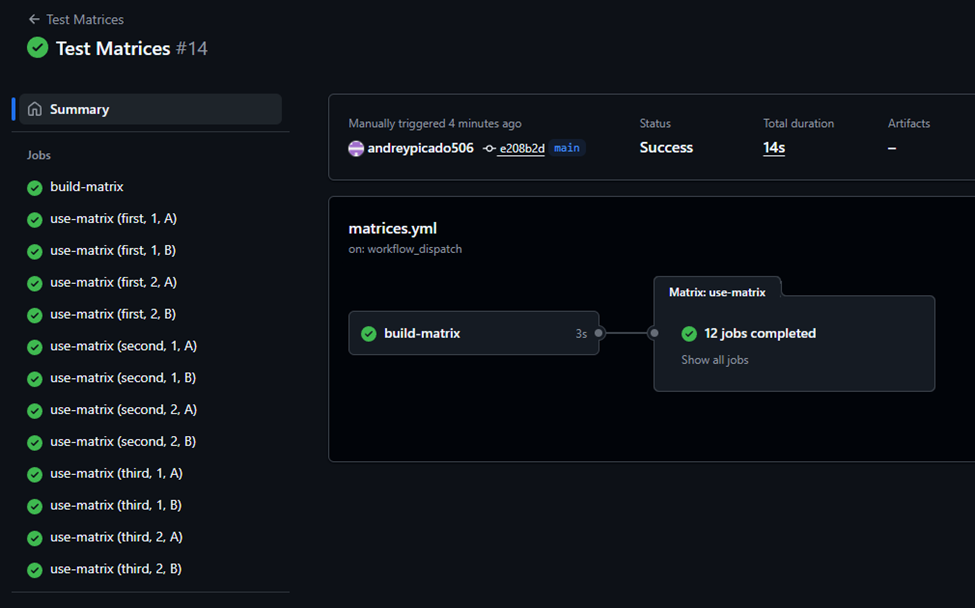
This workflow generates the same number of jobs (12) as the previous example:
We can also make include and exclude part of the matrix, just like we do with the YAML syntax. However, when this is the case, GitHub Actions will only create a job for each element in the include property. It will not create jobs based on all combinations of the variables. This means the original formula to calculate the number of jobs no longer applies. Instead, the number of jobs is equal to the elements in include. Let’s consider an example:
jobs:
  build-matrix:
    runs-on: ubuntu-latest
    outputs:
      custom-matrix: ${{ steps.build-matrix.outputs.custom-matrix }}
    steps:
      - name: Build matrix
        id: build-matrix
        run: |
          names=(first second third)
          numbers=(1 2)
          letters=(A B)

          # Build JSON with jq
          json=$(jq -n \
            --argjson names "$(printf '%s\n' "${names[@]}"   | jq -R . | jq -s .)" \
            --argjson nums  "$(printf '%s\n' "${numbers[@]}" | jq -R . | jq -s 'map(tonumber)')" \
            --argjson lets  "$(printf '%s\n' "${letters[@]}" | jq -R . | jq -s .)" '
            {
              include: [
                {
                  name:   $names,
                  number: $nums,
                  letter: $lets
                }
              ],
              exclude: []
            }')

          {
            echo 'custom-matrix<<EOF'
            echo "$json"
            echo EOF
          } >> $GITHUB_OUTPUT

  use-matrix:
    runs-on: ubuntu-latest
    needs: build-matrix
    strategy:
      matrix: ${{ fromJson(needs.build-matrix.outputs.custom-matrix) }}
    steps:
      - run: |
          echo "${{ matrix.name }}: ${{ matrix.number }}${{ matrix.letter }}"
This script only creates one job because there is only one element inside include:
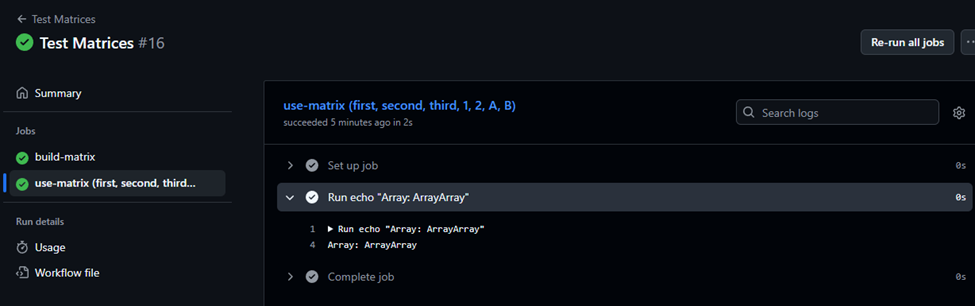
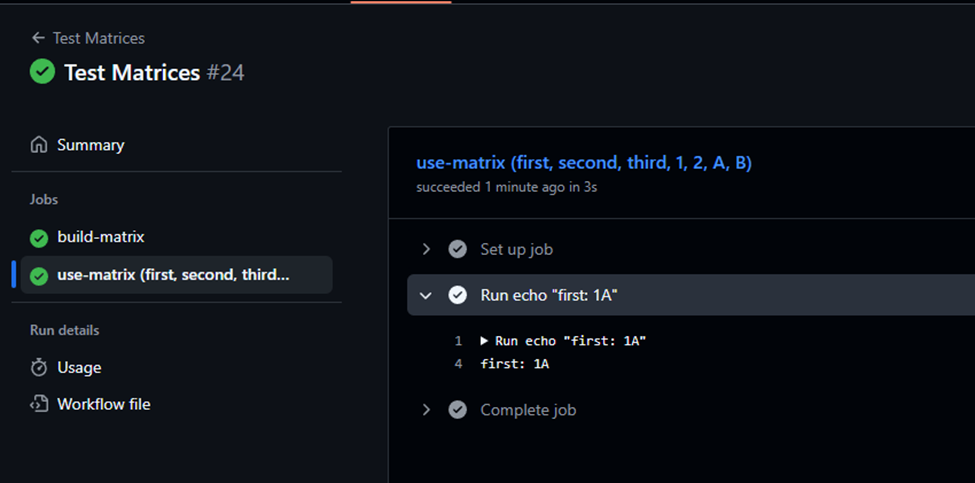
It can also be noted that, instead of printing the actual values from the JSON keys, GitHub just shows Array: ArrayArray. To get the real values, we need to reference the elements inside the arrays directly. Since we currently have only one element, we will fix this by including all possible combinations of variables in the next code example:
jobs:
  build-matrix:
    runs-on: ubuntu-latest
    outputs:
      custom-matrix: ${{ steps.build-matrix.outputs.custom-matrix }}
    steps:
      - name: Build matrix
        id: build-matrix
        run: |
          names=(first second third)
          numbers=(1 2)
          letters=(A B)

          # Build JSON with jq
          json=$(jq -n \
            --argjson names "$(printf '%s\n' "${names[@]}"   | jq -R . | jq -s .)" \
            --argjson nums  "$(printf '%s\n' "${numbers[@]}" | jq -R . | jq -s 'map(tonumber)')" \
            --argjson lets  "$(printf '%s\n' "${letters[@]}" | jq -R . | jq -s .)" '
            {
              include: [
                {
                  name:   $names,
                  number: $nums,
                  letter: $lets
                }
              ],
              exclude: []
            }')

          {
            echo 'custom-matrix<<EOF'
            echo "$json"
            echo EOF
          } >> $GITHUB_OUTPUT

  use-matrix:
    runs-on: ubuntu-latest
    needs: build-matrix
    strategy:
      matrix: ${{ fromJson(needs.build-matrix.outputs.custom-matrix) }}
    steps:
      - run: |
          echo "${{ matrix.name[0] }}: ${{ matrix.number[0] }}${{ matrix.letter[0] }}"
And this actually prints something:
Now, if we want to achieve the same result we had before adding include, where GitHub Actions automatically created a job for each possible combination of variables, we must first include all those combinations ourselves in the JSON. This is very simple to do using jq:
jobs:
  build-matrix:
    runs-on: ubuntu-latest
    outputs:
      custom-matrix: ${{ steps.build-matrix.outputs.custom-matrix }}
    steps:
      - name: Build matrix
        id: build-matrix
        run: |
          names=(first second third)
          numbers=(1 2)
          letters=(A B)

          # Build JSON with jq
          json=$(jq -n \
            --argjson names "$(printf '%s\n' "${names[@]}"   | jq -R . | jq -s .)" \
            --argjson nums  "$(printf '%s\n' "${numbers[@]}" | jq -R . | jq -s 'map(tonumber)')" \
            --argjson lets  "$(printf '%s\n' "${letters[@]}" | jq -R . | jq -s .)" '
            {
              include: [
                $names[] as $name
                | $nums[] as $num
                | $lets[] as $let
                | {
                    name:   $name,
                    number: $num,
                    letter: $let
                  }
              ],
              exclude: []
          }')

          {
            echo 'custom-matrix<<EOF'
            echo "$json"
            echo EOF
          } >> $GITHUB_OUTPUT

  use-matrix:
    runs-on: ubuntu-latest
    needs: build-matrix
    strategy:
      matrix: ${{ fromJson(needs.build-matrix.outputs.custom-matrix) }}
    steps:
      - run: |
          echo "${{ matrix.name }}: ${{ matrix.number }}${{ matrix.letter }}"
And now if we run this, we get:
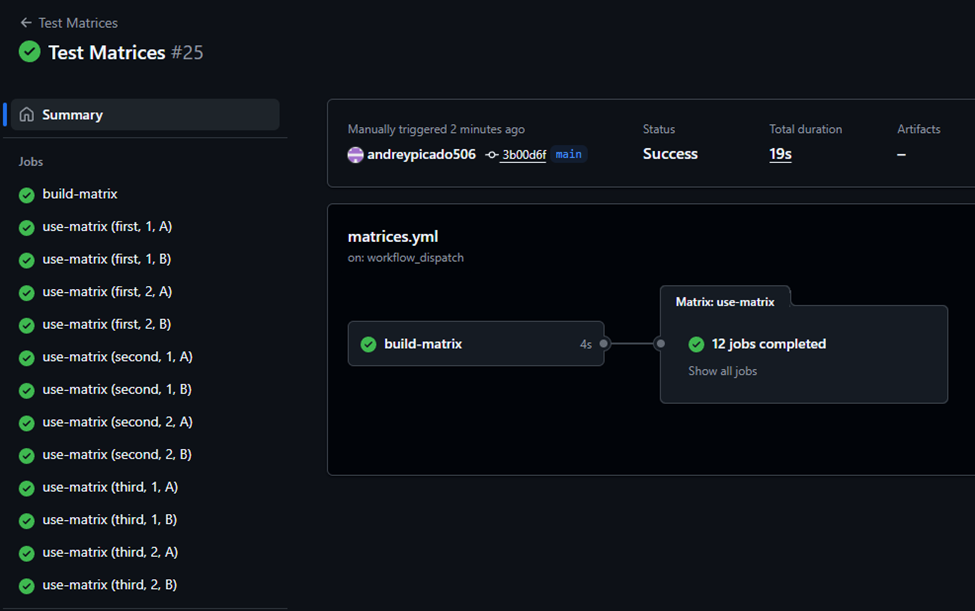
In this context, the exclude instruction in the JSON seems to be ignored. In my tests, the workflow failed every time I added an element to be excluded. The cause appears to be the lack of axes (because GitHub doesn’t calculate jobs from combinations of variables, but instead creates one job per element in include, as discussed before). In other words, if you don’t want a specific job combination but still want to use include, make sure you don’t add that job to the resulting JSON when building it in your script.
To use exclude, one option is to remove include, define all the keys at the top level of the matrix, and then use exclude to ignore one of the jobs calculated by GitHub. The code looks like this:
jobs:
  build-matrix:
    runs-on: ubuntu-latest
    outputs:
      custom-matrix: ${{ steps.build-matrix.outputs.custom-matrix }}
    steps:
      - name: Build matrix
        id: build-matrix
        run: |
          names=(first second third)
          numbers=(1 2)
          letters=(A B)

          json=$(jq -n \
            --argjson names "$(printf '%s\n' "${names[@]}"   | jq -R . | jq -s .)" \
            --argjson nums  "$(printf '%s\n' "${numbers[@]}" | jq -R . | jq -s 'map(tonumber)')" \
            --argjson lets  "$(printf '%s\n' "${letters[@]}" | jq -R . | jq -s .)" '
            {
              name:   $names,
              number: $nums,
              letter: $lets,
              exclude: [
                { name: "second", number: 2, letter: "B" }
              ]
            }')

          {
            echo 'custom-matrix<<EOF'
            echo "$json"
            echo EOF
          } >> $GITHUB_OUTPUT

  use-matrix:
    runs-on: ubuntu-latest
    needs: build-matrix
    strategy:
      matrix: ${{ fromJson(needs.build-matrix.outputs.custom-matrix) }}
    steps:
      - run: |
          echo "${{ matrix.name }}: ${{ matrix.number }}${{ matrix.letter }}"
And with this, we get:
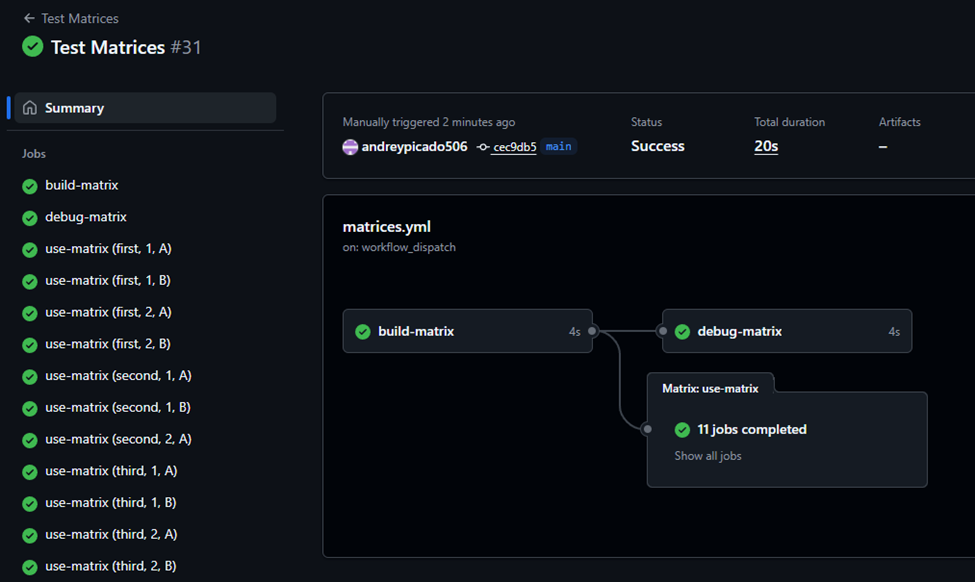
Notice that the combination { name: "second", number: 2, letter: "B" } was excluded, as intended.